Turn Homies Stats into a lead magnet that promotes itself.
One prompt runs the whole campaign from live Homies Stats: the complete interactive report, a gated 25% preview with a native lead form, and an Instagram carousel or Story wired to a comment-to-DM automation. Copy it, paste it into Homies, answer one question.
Data
Live Homies Stats only — manifests first, every number verified, every endpoint cited.
Charts
Pulled from the Stats API as embeds and images. The agent never draws its own.
Leads
The built-in Homies lead-capture form gates the full report; the DM sends only the preview.
Changelog
What changed since v1
The first run of this prompt drifted on three tool choices; v2 pinned them. v3 folds the Instagram promotion into the same prompt so the whole campaign comes out of one run.
- 1
Homies Stats only — never stats.realist.ca
The first run cited a legacy host in the methodology. The prompt now names the allowed host once, lists the manifest endpoints, and forbids every other host by name.
- 2
Charts are pulled as Homies Stats embeds from the API
Hand-built Recharts looked worse than the native charts. Every chart must now be a live Stats view with &embed=1, framed as-is — tooltips, period switches and brand palette come for free.
- 3
Built-in lead-capture form, not the Homie Forms API
The agent wired a custom POST to the Homie Forms lead API, which is being sunset. The prompt uses the in-house lead-capture form skill and bans the API endpoint by name.
- 4
An honest gate when there is no redirect_url
The built-in form does not expose a redirect setting, so the first run promised a redirect it could not make. The prompt spells out the fallback — reveal the full-report link only in the post-submit state — and asks which path was used.
- 5
Instagram carousel, Story and Zernio automation folded in
The prompt opens with one question — carousel, Story or both — then builds report → form → preview → assets in order, stops for confirmation before posting, and wires Zernio’s comment-to-DM (or story_reply) automation to the shortened report.
The prompt
Paste as-is. It asks one question, then runs the campaign.
Your HomiesAI profile supplies the name, brokerage, colours, headshot and connected Instagram account. Everything else is pinned.
Create a complete branded market-report campaign for me using live Homies Stats, the built-in Homies lead-capture form, and my connected Instagram account.

FIRST, ask me one question and wait:

Which Instagram promotion do you want?

A. Carousel — people comment REPORT and automatically receive the report by DM
B. Story — a Story promoting the report
C. Both

Recommend the carousel if I want the most automated lead-generation experience. If my market is not saved on my profile, ask for it in that same message. Ask nothing else.

Use my saved HomiesAI profile automatically for my name, brokerage, service area, contact details, colours, typography, logo, headshot and connected Instagram account. Do not ask me for information already saved.

DATA

Use only live data from Homies Stats at homiesai.com/stats. Every endpoint you call or cite must be on that host. Do not use stats.realist.ca, crea-stats-explorer, or any other data host, and do not use cached numbers from memory.

Start with the Homies Stats API manifests and never guess a geography slug, measure or series key:

- https://homiesai.com/stats/data/manifest.json — geographies, measures, latestMonth
- https://homiesai.com/stats/data/{slug}.json — one market’s full history, series keyed {class}.{adjustment}.{measure}
- https://homiesai.com/stats/data/macro/manifest.json and /data/macro/all.json — rates, CPI, population, starts
- https://homiesai.com/stats/AGENTS.md — the full endpoint reference if you need more

Choose the strongest current housing-market story for my local audience unless I specify a topic.

Verify every number. Calculate the latest complete value, month-over-month and year-over-year change, and relevant historical comparisons. Clearly identify preliminary data. Include the reporting period, underlying source and the exact Homies Stats endpoints used.

Attribute everything as:
Data: Homies Stats · homiesai.com/stats

Also identify the underlying organization from the dataset metadata, such as CREA, TRREB, Statistics Canada or the Bank of Canada.

CHARTS

Do not build charts yourself — no Recharts, Chart.js, D3, inline SVG or generated images. Every chart in both reports is a live Homies Stats interactive embed, placed in the report as an iframe. Build each embed URL from the same series you verified, on a Homies Stats view route with &embed=1 appended:

- https://homiesai.com/stats/explore?g={slug}&m={measure}&from={yyyymm}&embed=1 — raw series
- https://homiesai.com/stats/yoy?g={slug}&m={measure}&from={yyyymm}&embed=1 — year-over-year %
- https://homiesai.com/stats/compare?g={slug},{slug}&m={measure}&base={yyyymm}&embed=1 — indexed comparison
- https://homiesai.com/stats/balance?g={slug}&embed=1 — buyer’s / seller’s market gauges
- https://homiesai.com/stats/macro?g={slug}&m={measure}&x={macro-keys}&mode=dual&embed=1 — housing vs rates, rent, population
- https://homiesai.com/stats/overlay?g={slug}&m={measure}&years={yyyy,…}&embed=1 — this year vs past years

Add &credit={my name} so the attribution line carries my branding, and &pal={brokerage preset} or &colors={hex,hex} to match my profile colours. Give each iframe a title, width 100%, a height of at least 420px, and loading="lazy".

For the Instagram slides and Story image, which are static, use the same chart from the Stats image endpoint — https://homiesai.com/stats/api/chart?{same params}&format=png&credit={my name}&pal=… — sized for the slide. Never draw a chart yourself for any output.

Embeds stay live. The inlined data snapshot is for the numbers in headlines, stat tiles and prose only, so the text never depends on a runtime API request.

BUILD ORDER

After I answer the question, build in this order and do not skip ahead:

1. Build and publish the complete interactive report.
2. Create and publish the lead-capture form, gated as described in THE GATE.
3. Build and publish the shortened report with its registration gate.
4. Create the selected Instagram assets and automation — and stop for my confirmation before anything is posted or activated.

FULL REPORT

Make it a responsive, interactive HTML or React report that works well on phones and desktops. It should include:

- Branded cover and executive summary
- Three to five important market statistics
- Homies Stats chart embeds with clear endpoint labels
- Current conditions versus one year ago
- Relevant historical high, low or long-run comparison
- Plain-language interpretation
- Separate implications for buyers, sellers and homeowners
- A local-market conclusion and my branded call to action
- Methodology, reporting period, sources and embed URLs

Publish it as a permanent, unlisted Homies artifact.

LEAD FORM

Use the built-in Homies lead-capture form skill. Do not use the Homie Forms API, the manage-forms API, or any api.homiesai.com forms endpoint — that service is being sunset. Do not create a decorative form inside the report, use the generic artifact contact widget, or use Jotform, Google Forms, Zapier or another third-party form service.

Create and publish an unlisted lead-capture form with:

- Full name — required, semantic: full_name
- Email — required, semantic: email
- Phone — optional, semantic: phone
- “I’m interested as a…” — optional choices: Buyer, Seller, Homeowner, Investor
- An unselected consent checkbox using clear language for receiving market updates
- Hidden source fields identifying the report, market and campaign

Use this visitor-facing copy:
Title: Register to continue reading
Description: Enter your details to unlock the complete market report.
Submit button: Unlock the full report
Success message: You’re in — opening the complete report now.

Submissions must be stored in my Homies lead warehouse under my account, preserving the normalized name, email and phone fields for future CRM processing. Do not begin automated email, SMS or CRM outreach unless I have already approved such a workflow.

THE GATE

Preferred: if the built-in form supports an on-success destination, set it to the full-report URL so registrants are redirected automatically.

Fallback: if it does not, do not fake a redirect. After a successful submission, show the success message and reveal an “Open the complete report” button in the post-submit state. The full-report URL may appear only inside that post-submit success state — never in the pre-submit content, the gate teaser, or a comment.

Tell me which path you used.

SHORTENED REPORT

Create a separate public preview report using the same branding, data and visual system as the full report.

Include approximately the first 25% of the substantive report:

- Branded cover and headline
- Three topline statistics
- Executive summary
- One complete Homies Stats chart embed
- A short interpretation

At the cutoff, show a tasteful locked-content section that previews the remaining topics without exposing their numbers. Add a prominent “Register to continue reading” button that opens the lead-capture form in the same browser tab.

Do not place the full report’s remaining data or its direct URL inside the preview’s pre-submit HTML or JavaScript.

INSTAGRAM CAROUSEL

If I choose Carousel or Both:

Create four finished 1080×1350 PNG slides using my branding:

Slide 1: The strongest hook and headline statistic.
Slide 2: The main chart from the Stats image endpoint, with its latest value and historical comparison.
Slide 3: What the result means for buyers, sellers or homeowners locally.
Slide 4: My headshot and this call to action:
Comment “REPORT” and I’ll send you the complete interactive market report.

Write a caption with the same call to action and no more than five hashtags.

Show me the finished carousel, caption and an automation summary, then ask for one final confirmation before publishing or activating anything.

When I approve:

1. Publish the carousel to my connected professional Instagram account.
2. Capture the resulting Instagram platform post ID.
3. Create a Zernio comment-to-DM automation scoped only to that post.
4. Trigger on the keyword REPORT using word matching with typo tolerance.
5. Also match REPORT when someone sends it directly by DM.
6. Deduplicate responses so one comment never receives repeated messages.
7. Enable tracked-link clicks and tag clickers as market-report-engaged.

Rotate these public replies:
- Sent — check your DMs.
- Just sent it. Take a look at your inbox.
- It’s on the way — check your messages.

Send this private message:
Thanks for asking! I put together an interactive market report showing what is changing and what it could mean locally. Preview the report below and register to unlock the complete analysis.

Include one URL button:
Button: View the market report
URL: the shortened report URL

Do not DM the direct full-report URL. The shortened report and the lead-capture form must remain the only path to the complete report.

Use Zernio’s native comment-to-DM automation. Do not imitate it with scheduled comment polling. If the required Zernio action is unavailable in Homies, do not claim it is active — deliver the assets and the report funnel, then name exactly which integration needs to be enabled.

INSTAGRAM STORY

If I choose Story or Both:

Create one finished 1080×1920 Story image containing:

- The headline statistic
- A simplified chart from the Stats image endpoint
- One short local takeaway
- My branding and headshot
- “Get the complete interactive market report”

Because Instagram’s publishing API cannot add a clickable link sticker, ask me to choose between:

1. Fully automated: publish through Zernio with “Reply REPORT for the full report,” then create a Zernio story_reply automation triggered by REPORT that DMs the shortened-report link with the same “View the market report” button.
2. Clickable link: give me the finished Story image and the shortened-report URL so I can add Instagram’s native link sticker myself.

Do not claim that a clickable Story sticker was added automatically. For the automated option, publish through Zernio as contentType: story.

DELIVERY

Return:

1. The shortened report URL, clearly labelled “Share this link.”
2. The full report URL, clearly labelled “Owner copy — do not distribute directly.”
3. The lead-capture form name, form ID, and which gate path (redirect or post-submit reveal) is in use.
4. The list of Homies Stats embed and image URLs used in each output.
5. The finished carousel and/or Story assets.
6. The Instagram caption.
7. The automation’s ID and status after activation, or the exact integration still needed.
8. Confirmation that new registrations will appear in my Homies lead warehouse.

Verify that both report links load, every embed renders, and the form is published. Do not create a fake submission unless I explicitly approve a test lead. Never say something was published, linked, redirected or automated unless that operation actually succeeded. Do not stop at a mockup, code sample or design description — deliver the live published reports, the working form, and the finished assets.
Step 1
Paste the prompt into Homies and answer the one question: carousel, Story or both.
Step 2
It publishes the full report, creates the lead form, then publishes the gated preview.
Step 3
It shows you the finished slides, caption and automation summary, and waits for your go-ahead.
Step 4
On approval it posts to Instagram and activates the REPORT comment-to-DM automation. Leads land in your warehouse.
Sample output
The gated preview, as generated for the GTA.
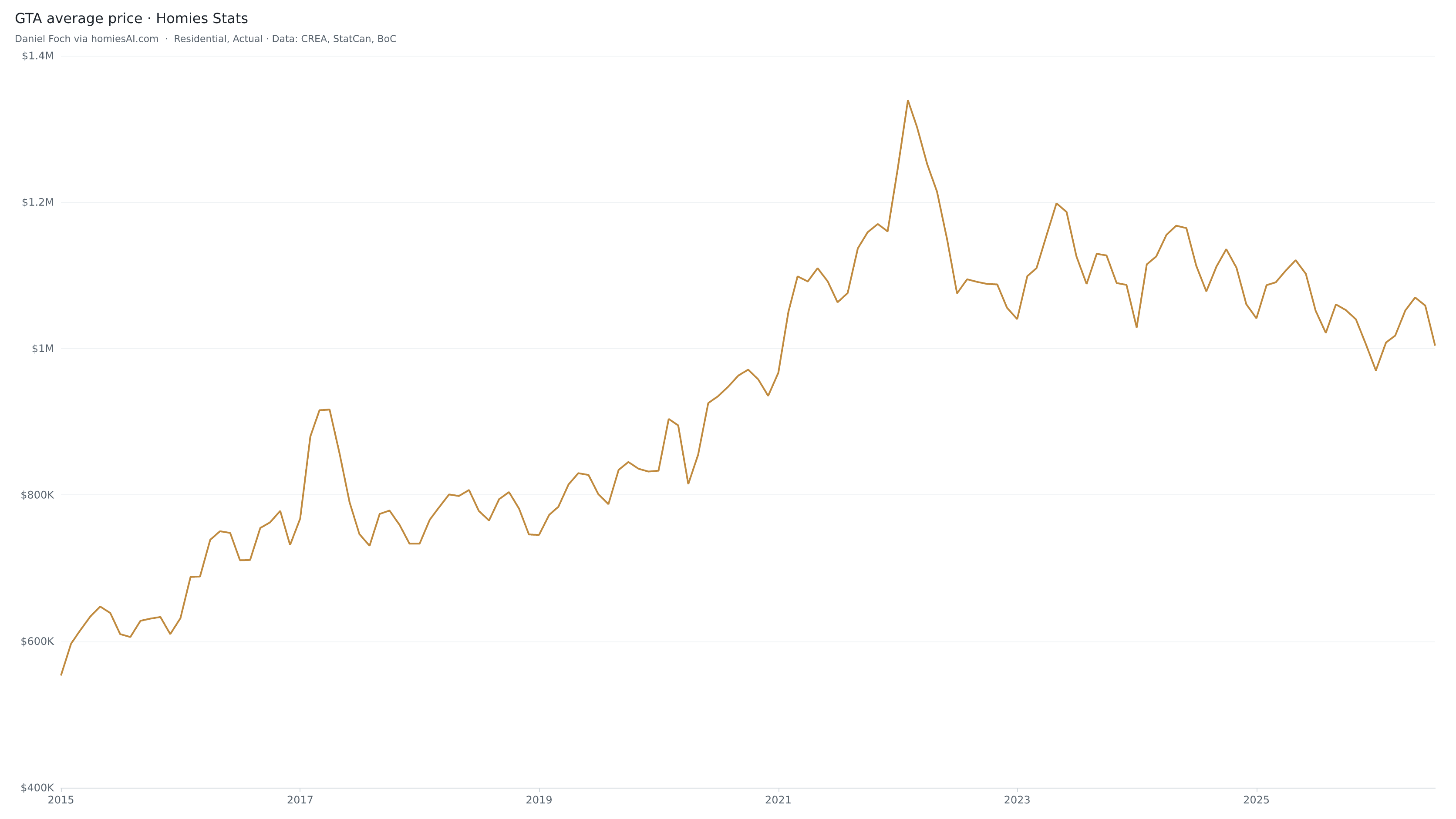
July 2026 preliminary data. The chart is a live Homies Stats embed; the numbers are inlined from the verified snapshot.
GTA prices slip below $1M as new listings dry up.
A quieter July for the Toronto board geography: average price fell for the second month, sales eased, and new listings dropped sharply — tightening a market that had been loosening all spring.
$1.00M
Average price · $1,003,956
−4.5% vs July 2025 · −5.2% month over month
5,995
Unit sales
−0.9% vs July 2025 · −11.4% month over month
14,484
New listings
−17.8% vs July 2025 · −16.2% month over month
Prices gave back almost all of the spring’s gains in a single month, but the supply side moved faster: new listings fell 17.8% year over year, pushing the sales-to-new-listings ratio to 41.4% from 34.3% a year ago. That is the edge of balanced territory, not a buyer’s market.
- Price vs. the Feb 2022 high
- Sales-to-listings trend
- Buyers · Sellers · Homeowners
- Where the GTA goes next
Register to continue reading
Enter your details to unlock the complete market report.
Unlock the full reportData: Homies Stats · homiesai.com/stats · CREA
Sample output
The carousel that sends the report by DM.
Four 1080×1350 slides in your branding. Anyone who comments REPORT gets the shortened-report link in a DM from Zernio; the form on that page is still the only way to the complete report.
GTA · July 2026
1 / 4
Average price just fell below $1M.
Down 5.2% in a month and 4.5% from a year ago.
Average price · since 2015
2 / 4
$1,003,956 in July · 25% below the Feb 2022 high
What it means locally
3 / 4
Listings dropped faster than sales, so buyers have less to choose from even as prices soften.
Sales-to-new-listings: 41.4%, up from 34.3% a year ago.
4 / 4
Comment “REPORT” and I’ll send you the complete interactive market report.
Daniel Foch · Valery Real Estate Inc.
Zernio · comment-to-DM · keyword REPORT
Public reply
Sent — check your DMs.
Private message
Thanks for asking! I put together an interactive market report showing what is changing and what it could mean locally. Preview the report below and register to unlock the complete analysis.
View the market reportThe charts
What the Stats API hands back, framed as-is.
Every chart in a generated report is one of these — a live Homies Stats view with &embed=1. Hover for tooltips; the period controls belong to the embed.
Delivery
What the agent hands back.
Eight labelled parts. If one is missing, it isn’t done.
- Share this linkThe shortened preview — the only URL you distribute, and the one the DM sends.
- Owner copyThe full report URL, never posted or DM’d directly.
- FormLead-capture form name, ID, and whether the gate redirects or reveals on success.
- ChartsEvery Homies Stats embed and image URL used, per output.
- AssetsThe finished carousel slides and/or Story image.
- CaptionThe Instagram caption with the REPORT call to action.
- AutomationThe Zernio automation ID and status — or the exact integration still needed.
- WarehouseConfirmation that registrations land in your Homies lead warehouse.
Explore the data behind it at homiesai.com/stats